
 Honesty
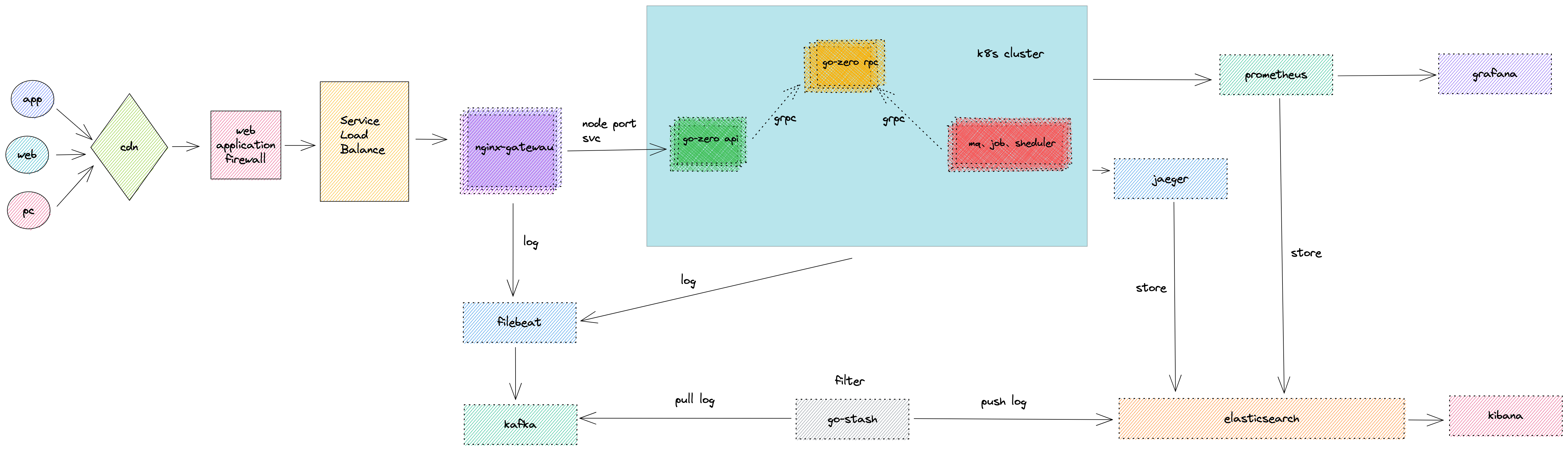
前言
如果说Go语言是云原生时代的"瑞士军刀",那么go-zero就是这把军刀上的"一键开刃"按钮。作为一个在微服务战场上摸爬滚打多年的老兵,我可以负责任地说:go-zero是我见过的最"懂事"的微服务框架——它知道程序员不想写重复代码,它知道我们需要开箱即用的服务治理,它甚至知道我们周五下午不想加班。
本文将带你深入go-zero的核心技术栈、最佳实践和微服务治理方式,让你从"这框架怎么用"进化到"这框架被我玩明白了"。
一、Go-zero技术栈全景图
1.1 整体架构
graph TB
subgraph "客户端层"
Web[Web应用]
Mobile[移动端]
ThirdParty[第三方服务]
end
subgraph "网关层"
Gateway[API Gateway
go-zero rest] end subgraph "服务层" subgraph "业务服务" UserSvc[用户服务] OrderSvc[订单服务] PaySvc[支付服务] ProductSvc[商品服务] end end subgraph "基础设施层" subgraph "服务治理" ETCD[etcd
服务发现] Breaker[熔断器] Limiter[限流器] Timeout[超时控制] end subgraph "数据层" MySQL[(MySQL)] Redis[(Redis)] Mongo[(MongoDB)] ES[(Elasticsearch)] end subgraph "消息队列" Kafka[Kafka] RabbitMQ[RabbitMQ] end subgraph "可观测性" Prometheus[Prometheus] Jaeger[Jaeger] ELK[ELK Stack] end end Web --> Gateway Mobile --> Gateway ThirdParty --> Gateway Gateway --> UserSvc Gateway --> OrderSvc Gateway --> PaySvc Gateway --> ProductSvc UserSvc --> ETCD OrderSvc --> ETCD PaySvc --> ETCD ProductSvc --> ETCD UserSvc --> MySQL OrderSvc --> MySQL PaySvc --> Redis ProductSvc --> Mongo OrderSvc --> Kafka PaySvc --> Kafka UserSvc --> Prometheus OrderSvc --> Jaeger
go-zero rest] end subgraph "服务层" subgraph "业务服务" UserSvc[用户服务] OrderSvc[订单服务] PaySvc[支付服务] ProductSvc[商品服务] end end subgraph "基础设施层" subgraph "服务治理" ETCD[etcd
服务发现] Breaker[熔断器] Limiter[限流器] Timeout[超时控制] end subgraph "数据层" MySQL[(MySQL)] Redis[(Redis)] Mongo[(MongoDB)] ES[(Elasticsearch)] end subgraph "消息队列" Kafka[Kafka] RabbitMQ[RabbitMQ] end subgraph "可观测性" Prometheus[Prometheus] Jaeger[Jaeger] ELK[ELK Stack] end end Web --> Gateway Mobile --> Gateway ThirdParty --> Gateway Gateway --> UserSvc Gateway --> OrderSvc Gateway --> PaySvc Gateway --> ProductSvc UserSvc --> ETCD OrderSvc --> ETCD PaySvc --> ETCD ProductSvc --> ETCD UserSvc --> MySQL OrderSvc --> MySQL PaySvc --> Redis ProductSvc --> Mongo OrderSvc --> Kafka PaySvc --> Kafka UserSvc --> Prometheus OrderSvc --> Jaeger
1.2 核心组件清单
| 组件类型 | 组件名称 | 用途 | 重要程度 |
|---|---|---|---|
| 代码生成 | goctl | 一键生成API/RPC代码 | ⭐⭐⭐⭐⭐ |
| HTTP框架 | rest | RESTful API服务 | ⭐⭐⭐⭐⭐ |
| RPC框架 | zrpc | gRPC封装,服务间通信 | ⭐⭐⭐⭐⭐ |
| 服务发现 | etcd/consul | 服务注册与发现 | ⭐⭐⭐⭐⭐ |
| ORM | sqlx/sqlc | 数据库操作 | ⭐⭐⭐⭐ |
| 缓存 | cache | 自动缓存管理 | ⭐⭐⭐⭐ |
| 限流 | limit | 并发和频率控制 | ⭐⭐⭐⭐ |
| 熔断 | breaker | 服务降级保护 | ⭐⭐⭐⭐ |
| 链路追踪 | trace | 分布式追踪 | ⭐⭐⭐ |
| 消息队列 | queue | Kafka/Beanstalkd封装 | ⭐⭐⭐ |
二、项目结构最佳实践
2.1 推荐的目录结构
mall/
├── apps/                          # 所有微服务
│   ├── user/                      # 用户服务
│   │   ├── api/                   # HTTP API
│   │   │   ├── etc/               # 配置文件
│   │   │   │   └── user.yaml
│   │   │   ├── internal/
│   │   │   │   ├── config/        # 配置结构
│   │   │   │   ├── handler/       # HTTP处理器
│   │   │   │   ├── logic/         # 业务逻辑(核心!)
│   │   │   │   ├── svc/           # 服务依赖注入
│   │   │   │   └── types/         # 请求/响应类型
│   │   │   ├── user.api           # API定义文件
│   │   │   └── user.go            # 入口文件
│   │   └── rpc/                   # gRPC服务
│   │       ├── etc/
│   │       ├── internal/
│   │       ├── pb/                # protobuf生成的代码
│   │       ├── user.proto         # proto定义
│   │       └── user.go
│   ├── order/                     # 订单服务
│   ├── payment/                   # 支付服务
│   └── product/                   # 商品服务
├── pkg/                           # 公共包
│   ├── xerr/                      # 统一错误处理
│   ├── xcode/                     # 业务状态码
│   ├── middleware/                # 公共中间件
│   └── utils/                     # 工具函数
├── deploy/                        # 部署配置
│   ├── docker/
│   ├── k8s/
│   └── nginx/
├── doc/                           # 文档
├── scripts/                       # 脚本
└── go.mod
2.2 服务依赖关系
flowchart LR
subgraph "API Gateway"
UAPI[User API]
OAPI[Order API]
PAPI[Payment API]
end
subgraph "RPC Services"
URPC[User RPC]
ORPC[Order RPC]
PRPC[Payment RPC]
ProdRPC[Product RPC]
end
UAPI --> URPC
OAPI --> ORPC
OAPI --> URPC
OAPI --> ProdRPC
PAPI --> PRPC
PAPI --> ORPC
ORPC --> URPC
ORPC --> ProdRPC
PRPC --> ORPC
三、goctl代码生成实战
3.1 API文件编写规范
// user.api - API定义文件
syntax = "v1"

info (
    title: "用户服务API"
    desc: "用户相关的所有接口"
    author: "Joey"
    email: "joey@astratech.ae"
    version: "1.0"
)

// ==================== 类型定义 ====================

type (
    // 用户注册请求
    RegisterReq {
        Mobile   string `json:"mobile" validate:"required,mobile"`
        Password string `json:"password" validate:"required,min=6,max=20"`
        Code     string `json:"code" validate:"required,len=6"`
    }

    // 用户注册响应
    RegisterResp {
        UserId int64  `json:"userId"`
        Token  string `json:"token"`
    }

    // 用户信息
    UserInfo {
        UserId   int64  `json:"userId"`
        Nickname string `json:"nickname"`
        Avatar   string `json:"avatar"`
        Mobile   string `json:"mobile"`
        Level    int32  `json:"level"`
    }

    // 获取用户信息请求
    GetUserInfoReq {
        UserId int64 `path:"userId"`
    }

    // 获取用户信息响应
    GetUserInfoResp {
        UserInfo
    }
)

// ==================== 服务定义 ====================

@server (
    prefix: /api/v1/user
    group: user
)
service user-api {
    @doc "用户注册"
    @handler Register
    post /register (RegisterReq) returns (RegisterResp)
}

@server (
    prefix: /api/v1/user
    group: user
    jwt: Auth           // JWT认证
    middleware: AuthMiddleware  // 自定义中间件
)
service user-api {
    @doc "获取用户信息"
    @handler GetUserInfo
    get /:userId (GetUserInfoReq) returns (GetUserInfoResp)

    @doc "更新用户信息"
    @handler UpdateUserInfo
    put /info (UpdateUserInfoReq) returns (UpdateUserInfoResp)
}
3.2 Proto文件编写规范
// user.proto
syntax = "proto3";

package user;

option go_package = "./pb";

// 用户服务
service UserService {
    // 获取用户信息
    rpc GetUser(GetUserReq) returns (GetUserResp);
    // 根据手机号获取用户
    rpc GetUserByMobile(GetUserByMobileReq) returns (GetUserResp);
    // 创建用户
    rpc CreateUser(CreateUserReq) returns (CreateUserResp);
    // 更新用户
    rpc UpdateUser(UpdateUserReq) returns (UpdateUserResp);
}

message GetUserReq {
    int64 user_id = 1;
}

message GetUserResp {
    int64 user_id = 1;
    string nickname = 2;
    string avatar = 3;
    string mobile = 4;
    int32 level = 5;
    int64 created_at = 6;
}

message GetUserByMobileReq {
    string mobile = 1;
}

message CreateUserReq {
    string mobile = 1;
    string password = 2;
    string nickname = 3;
}

message CreateUserResp {
    int64 user_id = 1;
}

message UpdateUserReq {
    int64 user_id = 1;
    string nickname = 2;
    string avatar = 3;
}

message UpdateUserResp {
    bool success = 1;
}
3.3 goctl常用命令速查
# ==================== API相关 ====================

# 根据api文件生成代码
goctl api go -api user.api -dir . -style goZero

# 生成API文档
goctl api doc -dir . -o ./doc

# API格式化
goctl api format -dir .

# ==================== RPC相关 ====================

# 根据proto生成rpc代码
goctl rpc protoc user.proto --go_out=./pb --go-grpc_out=./pb --zrpc_out=. -style goZero

# ==================== Model相关 ====================

# 根据MySQL表结构生成model
goctl model mysql ddl -src user.sql -dir ./model -style goZero

# 从数据库直接生成(推荐)
goctl model mysql datasource -url "root:password@tcp(127.0.0.1:3306)/mall" \
    -table "user" -dir ./model -style goZero -c

# ==================== Docker相关 ====================

# 生成Dockerfile
goctl docker -go user.go -port 8080

# ==================== K8s相关 ====================

# 生成k8s部署文件
goctl kube deploy -name user-api -namespace mall -image user-api:v1.0 \
    -port 8080 -replicas 3 -o ./deploy/k8s/user-api.yaml
四、服务治理核心能力
4.1 服务治理全景
flowchart TB
subgraph "服务治理核心能力"
direction TB
subgraph "流量管控"
RateLimit[限流
令牌桶/滑动窗口] LoadBalance[负载均衡
P2C算法] Timeout[超时控制
自适应超时] end subgraph "容错保护" CircuitBreaker[熔断器
google/sre算法] Retry[重试机制
指数退避] Fallback[降级策略] end subgraph "服务发现" Registry[服务注册
etcd/consul] Discovery[服务发现
动态更新] HealthCheck[健康检查
心跳机制] end subgraph "可观测性" Metrics[指标采集
Prometheus] Tracing[链路追踪
Jaeger/Zipkin] Logging[日志收集
结构化日志] end end Client[客户端请求] --> RateLimit RateLimit --> LoadBalance LoadBalance --> CircuitBreaker CircuitBreaker --> Discovery Discovery --> Service[目标服务] Service --> Metrics Service --> Tracing Service --> Logging
令牌桶/滑动窗口] LoadBalance[负载均衡
P2C算法] Timeout[超时控制
自适应超时] end subgraph "容错保护" CircuitBreaker[熔断器
google/sre算法] Retry[重试机制
指数退避] Fallback[降级策略] end subgraph "服务发现" Registry[服务注册
etcd/consul] Discovery[服务发现
动态更新] HealthCheck[健康检查
心跳机制] end subgraph "可观测性" Metrics[指标采集
Prometheus] Tracing[链路追踪
Jaeger/Zipkin] Logging[日志收集
结构化日志] end end Client[客户端请求] --> RateLimit RateLimit --> LoadBalance LoadBalance --> CircuitBreaker CircuitBreaker --> Discovery Discovery --> Service[目标服务] Service --> Metrics Service --> Tracing Service --> Logging
4.2 限流配置详解
# etc/user.yaml
Name: user-api
Host: 0.0.0.0
Port: 8080

# 限流配置
MaxConns: 10000        # 最大并发连接数

# 基于Redis的分布式限流
Redis:
  Host: 127.0.0.1:6379
  Type: node
  Pass: ""

# 自定义限流规则
RateLimit:
  Period: 1           # 时间窗口(秒)
  Quota: 100          # 窗口内允许的请求数
限流实现代码:
package middleware

import (
    "net/http"
    "github.com/zeromicro/go-zero/core/limit"
    "github.com/zeromicro/go-zero/rest"
)

// 令牌桶限流器
func TokenLimitMiddleware(store *redis.Redis, rate, burst int) rest.Middleware {
    limiter := limit.NewTokenLimiter(rate, burst, store, "api:limit")

    return func(next http.HandlerFunc) http.HandlerFunc {
        return func(w http.ResponseWriter, r *http.Request) {
            if !limiter.Allow() {
                http.Error(w, "请求过于频繁,请稍后重试", http.StatusTooManyRequests)
                return
            }
            next(w, r)
        }
    }
}

// 周期限流器(滑动窗口)
func PeriodLimitMiddleware(store *redis.Redis, period, quota int) rest.Middleware {
    limiter := limit.NewPeriodLimit(period, quota, store, "api:period")

    return func(next http.HandlerFunc) http.HandlerFunc {
        return func(w http.ResponseWriter, r *http.Request) {
            // 使用用户IP或用户ID作为限流key
            key := r.RemoteAddr

            code, err := limiter.Take(key)
            if err != nil {
                http.Error(w, "服务内部错误", http.StatusInternalServerError)
                return
            }

            switch code {
            case limit.OverQuota:
                http.Error(w, "请求配额已用完", http.StatusTooManyRequests)
                return
            case limit.HitQuota:
                // 即将达到限制,可以添加警告header
                w.Header().Set("X-RateLimit-Remaining", "0")
            }

            next(w, r)
        }
    }
}
4.3 熔断器详解
stateDiagram-v2
[*] --> Closed: 初始状态
Closed --> Open: 错误率超过阈值
Closed --> Closed: 请求正常
Open --> HalfOpen: 冷却期结束
Open --> Open: 拒绝所有请求
HalfOpen --> Closed: 探测请求成功
HalfOpen --> Open: 探测请求失败
note right of Closed
正常状态
所有请求正常通过
end note
note right of Open
熔断状态
所有请求快速失败
end note
note right of HalfOpen
半开状态
允许部分请求探测
end note
熔断器使用示例:
package logic

import (
    "context"
    "github.com/zeromicro/go-zero/core/breaker"
)

type OrderLogic struct {
    ctx    context.Context
    svcCtx *svc.ServiceContext
    breaker breaker.Breaker
}

func NewOrderLogic(ctx context.Context, svcCtx *svc.ServiceContext) *OrderLogic {
    return &OrderLogic{
        ctx:    ctx,
        svcCtx: svcCtx,
        // go-zero使用Google SRE熔断算法
        breaker: breaker.NewBreaker(),
    }
}

func (l *OrderLogic) CreateOrder(req *types.CreateOrderReq) (*types.CreateOrderResp, error) {
    // 使用熔断器包装调用
    var resp *types.CreateOrderResp

    err := l.breaker.DoWithAcceptable(func() error {
        // 调用支付服务
        payResp, err := l.svcCtx.PaymentRpc.Pay(l.ctx, &payment.PayReq{
            OrderId: req.OrderId,
            Amount:  req.Amount,
        })
        if err != nil {
            return err
        }

        resp = &types.CreateOrderResp{
            PaymentId: payResp.PaymentId,
            Status:    payResp.Status,
        }
        return nil
    }, func(err error) bool {
        // 定义哪些错误可以接受(不触发熔断)
        // 业务错误不应触发熔断,只有系统错误才应该
        return isBusinessError(err)
    })

    if err == breaker.ErrServiceUnavailable {
        // 服务熔断,返回降级响应
        return l.fallbackResponse(req), nil
    }

    return resp, err
}

// 降级响应
func (l *OrderLogic) fallbackResponse(req *types.CreateOrderReq) *types.CreateOrderResp {
    return &types.CreateOrderResp{
        Status:  "PENDING",
        Message: "订单已提交,支付结果稍后通知",
    }
}
4.4 负载均衡 - P2C算法
flowchart TB
subgraph "P2C负载均衡算法"
Request[客户端请求] --> Random[随机选择两个节点]
Random --> Compare{比较负载}
Compare --> |节点A负载更低| NodeA[选择节点A]
Compare --> |节点B负载更低| NodeB[选择节点B]
subgraph "负载计算公式"
Formula["负载 = inflight * ewma(响应时间)
inflight: 正在处理的请求数
ewma: 指数加权移动平均"] end end NodeA --> Success{请求结果} NodeB --> Success Success --> |成功| UpdateSuccess[更新成功统计] Success --> |失败| UpdateFail[更新失败统计] UpdateSuccess --> AdjustWeight[动态调整权重] UpdateFail --> AdjustWeight
inflight: 正在处理的请求数
ewma: 指数加权移动平均"] end end NodeA --> Success{请求结果} NodeB --> Success Success --> |成功| UpdateSuccess[更新成功统计] Success --> |失败| UpdateFail[更新失败统计] UpdateSuccess --> AdjustWeight[动态调整权重] UpdateFail --> AdjustWeight
P2C算法核心思想:
// go-zero内部实现的P2C算法简化版
type p2cPicker struct {
    conns []*subConn  // 所有可用连接
    r     *rand.Rand
}

func (p *p2cPicker) Pick(ctx context.Context, info balancer.PickInfo) (balancer.PickResult, error) {
    // 1. 随机选择两个节点
    var chosen *subConn

    switch len(p.conns) {
    case 0:
        return balancer.PickResult{}, balancer.ErrNoSubConnAvailable
    case 1:
        chosen = p.conns[0]
    default:
        // 随机选两个
        a := p.r.Intn(len(p.conns))
        b := p.r.Intn(len(p.conns) - 1)
        if b >= a {
            b++
        }

        // 2. 比较负载,选择负载较低的
        // 负载 = inflight * ewma(latency)
        if p.conns[a].load() < p.conns[b].load() {
            chosen = p.conns[a]
        } else {
            chosen = p.conns[b]
        }
    }

    // 3. 增加inflight计数
    atomic.AddInt64(&chosen.inflight, 1)

    return balancer.PickResult{
        SubConn: chosen.conn,
        Done: func(info balancer.DoneInfo) {
            // 4. 请求完成,更新统计
            atomic.AddInt64(&chosen.inflight, -1)
            chosen.updateLatency(info.Latency)
        },
    }, nil
}
4.5 自适应超时
sequenceDiagram
participant Client as 客户端
participant Gateway as API网关
participant UserSvc as 用户服务
participant OrderSvc as 订单服务
participant PaySvc as 支付服务
Note over Client,PaySvc: 超时传递机制
Client->>Gateway: 请求 (总超时: 5s)
Gateway->>Gateway: 处理耗时: 50ms
Gateway->>UserSvc: 请求 (剩余: 4.95s)
UserSvc->>UserSvc: 处理耗时: 100ms
UserSvc->>OrderSvc: 请求 (剩余: 4.85s)
OrderSvc->>OrderSvc: 处理耗时: 200ms
OrderSvc->>PaySvc: 请求 (剩余: 4.65s)
PaySvc-->>OrderSvc: 响应
OrderSvc-->>UserSvc: 响应
UserSvc-->>Gateway: 响应
Gateway-->>Client: 响应 (总耗时: 1.2s)
超时配置示例:
# API服务配置
Name: user-api
Host: 0.0.0.0
Port: 8080
Timeout: 5000  # 整体超时5秒

# RPC客户端配置
UserRpc:
  Etcd:
    Hosts:
      - 127.0.0.1:2379
    Key: user.rpc
  Timeout: 3000   # RPC调用超时3秒

# 可以针对不同接口配置不同超时
TimeoutConfig:
  "/api/v1/user/info": 1000      # 用户信息接口1秒超时
  "/api/v1/order/create": 10000   # 创建订单接口10秒超时
五、缓存最佳实践
5.1 缓存架构
flowchart TB
subgraph "多级缓存架构"
Request[请求] --> L1[L1: 进程内缓存
sync.Map / freecache] L1 --> |未命中| L2[L2: Redis缓存
分布式缓存] L2 --> |未命中| DB[(数据库)] DB --> |回填| L2 L2 --> |回填| L1 end subgraph "缓存策略" Strategy1[Cache-Aside
旁路缓存] Strategy2[Read-Through
穿透读] Strategy3[Write-Behind
异步写] Strategy4[Refresh-Ahead
预刷新] end
sync.Map / freecache] L1 --> |未命中| L2[L2: Redis缓存
分布式缓存] L2 --> |未命中| DB[(数据库)] DB --> |回填| L2 L2 --> |回填| L1 end subgraph "缓存策略" Strategy1[Cache-Aside
旁路缓存] Strategy2[Read-Through
穿透读] Strategy3[Write-Behind
异步写] Strategy4[Refresh-Ahead
预刷新] end
5.2 go-zero缓存使用
// model/usermodel.go
package model

import (
    "context"
    "database/sql"
    "fmt"
    "time"

    "github.com/zeromicro/go-zero/core/stores/cache"
    "github.com/zeromicro/go-zero/core/stores/sqlx"
)

type (
    UserModel interface {
        Insert(ctx context.Context, data *User) (sql.Result, error)
        FindOne(ctx context.Context, id int64) (*User, error)
        FindOneByMobile(ctx context.Context, mobile string) (*User, error)
        Update(ctx context.Context, data *User) error
        Delete(ctx context.Context, id int64) error
    }

    defaultUserModel struct {
        sqlx.CachedConn
        table string
    }

    User struct {
        Id        int64     `db:"id"`
        Mobile    string    `db:"mobile"`
        Password  string    `db:"password"`
        Nickname  string    `db:"nickname"`
        Avatar    string    `db:"avatar"`
        Level     int32     `db:"level"`
        CreatedAt time.Time `db:"created_at"`
        UpdatedAt time.Time `db:"updated_at"`
    }
)

func NewUserModel(conn sqlx.SqlConn, c cache.CacheConf) UserModel {
    return &defaultUserModel{
        CachedConn: sqlx.NewConn(conn, c),
        table:      "user",
    }
}

// 缓存key格式
var (
    cacheUserIdPrefix     = "cache:user:id:"
    cacheUserMobilePrefix = "cache:user:mobile:"
)

// FindOne 带缓存的查询
func (m *defaultUserModel) FindOne(ctx context.Context, id int64) (*User, error) {
    cacheKey := fmt.Sprintf("%s%d", cacheUserIdPrefix, id)
    var resp User

    err := m.QueryRowCtx(ctx, &resp, cacheKey, func(ctx context.Context, conn sqlx.SqlConn, v any) error {
        query := fmt.Sprintf("SELECT * FROM %s WHERE id = ? LIMIT 1", m.table)
        return conn.QueryRowCtx(ctx, v, query, id)
    })

    switch err {
    case nil:
        return &resp, nil
    case sqlx.ErrNotFound:
        return nil, ErrNotFound
    default:
        return nil, err
    }
}

// FindOneByMobile 基于唯一索引的缓存查询
func (m *defaultUserModel) FindOneByMobile(ctx context.Context, mobile string) (*User, error) {
    cacheKey := fmt.Sprintf("%s%s", cacheUserMobilePrefix, mobile)
    var resp User

    err := m.QueryRowIndexCtx(ctx, &resp, cacheKey,
        // 索引查询
        func(ctx context.Context, conn sqlx.SqlConn, v any) (any, error) {
            query := fmt.Sprintf("SELECT * FROM %s WHERE mobile = ? LIMIT 1", m.table)
            if err := conn.QueryRowCtx(ctx, &resp, query, mobile); err != nil {
                return nil, err
            }
            return resp.Id, nil
        },
        // 主键查询
        func(ctx context.Context, conn sqlx.SqlConn, v any, primary any) error {
            query := fmt.Sprintf("SELECT * FROM %s WHERE id = ? LIMIT 1", m.table)
            return conn.QueryRowCtx(ctx, v, query, primary)
        },
        // 主键缓存key
        func(primary any) string {
            return fmt.Sprintf("%s%d", cacheUserIdPrefix, primary.(int64))
        },
    )

    switch err {
    case nil:
        return &resp, nil
    case sqlx.ErrNotFound:
        return nil, ErrNotFound
    default:
        return nil, err
    }
}

// Update 更新时删除缓存
func (m *defaultUserModel) Update(ctx context.Context, data *User) error {
    // 先查询旧数据,获取需要删除的缓存key
    old, err := m.FindOne(ctx, data.Id)
    if err != nil {
        return err
    }

    // 需要删除的缓存key
    keys := []string{
        fmt.Sprintf("%s%d", cacheUserIdPrefix, data.Id),
        fmt.Sprintf("%s%s", cacheUserMobilePrefix, old.Mobile),
    }

    // 如果手机号变更,还要删除新手机号的缓存
    if data.Mobile != old.Mobile {
        keys = append(keys, fmt.Sprintf("%s%s", cacheUserMobilePrefix, data.Mobile))
    }

    // 执行更新并删除缓存
    _, err = m.ExecCtx(ctx, func(ctx context.Context, conn sqlx.SqlConn) (sql.Result, error) {
        query := fmt.Sprintf("UPDATE %s SET nickname = ?, avatar = ?, level = ? WHERE id = ?", m.table)
        return conn.ExecCtx(ctx, query, data.Nickname, data.Avatar, data.Level, data.Id)
    }, keys...)

    return err
}
5.3 缓存穿透/击穿/雪崩防护
flowchart TB
subgraph "缓存穿透"
P1[请求不存在的数据] --> P2{缓存}
P2 --> |未命中| P3{数据库}
P3 --> |不存在| P4[每次都查库]
P5[解决方案:
1. 布隆过滤器
2. 空值缓存
3. 参数校验] end subgraph "缓存击穿" B1[热点数据过期] --> B2[大量并发请求] B2 --> B3[同时查询数据库] B3 --> B4[数据库压力骤增] B5[解决方案:
1. 互斥锁
2. 永不过期+后台刷新
3. 预热机制] end subgraph "缓存雪崩" A1[大量缓存同时过期] --> A2[请求直接打到数据库] A2 --> A3[数据库崩溃] A4[解决方案:
1. 过期时间加随机
2. 多级缓存
3. 熔断降级] end
1. 布隆过滤器
2. 空值缓存
3. 参数校验] end subgraph "缓存击穿" B1[热点数据过期] --> B2[大量并发请求] B2 --> B3[同时查询数据库] B3 --> B4[数据库压力骤增] B5[解决方案:
1. 互斥锁
2. 永不过期+后台刷新
3. 预热机制] end subgraph "缓存雪崩" A1[大量缓存同时过期] --> A2[请求直接打到数据库] A2 --> A3[数据库崩溃] A4[解决方案:
1. 过期时间加随机
2. 多级缓存
3. 熔断降级] end
防护实现代码:
package cache

import (
    "context"
    "errors"
    "math/rand"
    "sync"
    "time"

    "github.com/zeromicro/go-zero/core/syncx"
)

var (
    ErrNotFound = errors.New("not found")

    // 单飞,防止缓存击穿
    singleFlight = syncx.NewSingleFlight()
)

type CacheManager struct {
    cache    Cache
    db       DB
    expiry   time.Duration
    mutex    sync.Mutex
}

// GetWithSingleFlight 使用SingleFlight防止缓存击穿
func (m *CacheManager) GetWithSingleFlight(ctx context.Context, key string) (any, error) {
    // 先查缓存
    val, err := m.cache.Get(ctx, key)
    if err == nil {
        return val, nil
    }

    // 使用SingleFlight,相同key的请求只有一个会真正执行
    result, err := singleFlight.Do(key, func() (any, error) {
        // 双重检查,可能已经被其他goroutine填充
        val, err := m.cache.Get(ctx, key)
        if err == nil {
            return val, nil
        }

        // 查数据库
        val, err = m.db.Get(ctx, key)
        if err != nil {
            if err == ErrNotFound {
                // 空值缓存,防止缓存穿透
                m.cache.Set(ctx, key, nil, 60*time.Second)
            }
            return nil, err
        }

        // 回填缓存,加随机过期时间防止雪崩
        jitter := time.Duration(rand.Intn(300)) * time.Second
        m.cache.Set(ctx, key, val, m.expiry+jitter)

        return val, nil
    })

    if err != nil {
        return nil, err
    }

    return result, nil
}

// GetWithBloomFilter 使用布隆过滤器防止缓存穿透
func (m *CacheManager) GetWithBloomFilter(ctx context.Context, key string, bloom *BloomFilter) (any, error) {
    // 布隆过滤器判断key是否可能存在
    if !bloom.MightContain(key) {
        return nil, ErrNotFound
    }

    // 正常的缓存查询逻辑
    return m.GetWithSingleFlight(ctx, key)
}
六、消息队列集成
6.1 Kafka集成架构
flowchart LR
subgraph "生产者"
OrderAPI[订单服务]
PayAPI[支付服务]
end
subgraph "Kafka集群"
subgraph "Topic: order-events"
P1[Partition 0]
P2[Partition 1]
P3[Partition 2]
end
end
subgraph "消费者组"
subgraph "Group: notification"
C1[Consumer 1]
C2[Consumer 2]
end
subgraph "Group: analytics"
C3[Consumer 3]
end
end
OrderAPI --> P1
OrderAPI --> P2
PayAPI --> P3
P1 --> C1
P2 --> C2
P3 --> C1
P1 --> C3
P2 --> C3
P3 --> C3
6.2 Kafka生产者配置
# etc/order.yaml
Name: order-api
Host: 0.0.0.0
Port: 8080

# Kafka配置
KafkaConf:
  Brokers:
    - 127.0.0.1:9092
    - 127.0.0.1:9093
    - 127.0.0.1:9094
  Topic: order-events
生产者代码:
// internal/svc/servicecontext.go
package svc

import (
    "github.com/zeromicro/go-queue/kq"
    "order-api/internal/config"
)

type ServiceContext struct {
    Config   config.Config
    KqPusher *kq.Pusher
}

func NewServiceContext(c config.Config) *ServiceContext {
    return &ServiceContext{
        Config:   c,
        KqPusher: kq.NewPusher(c.KafkaConf.Brokers, c.KafkaConf.Topic),
    }
}

// internal/logic/createorderlogic.go
package logic

import (
    "context"
    "encoding/json"
    "time"

    "order-api/internal/svc"
    "order-api/internal/types"
)

type OrderEvent struct {
    EventType string    `json:"eventType"`
    OrderId   int64     `json:"orderId"`
    UserId    int64     `json:"userId"`
    Amount    float64   `json:"amount"`
    Status    string    `json:"status"`
    Timestamp time.Time `json:"timestamp"`
}

type CreateOrderLogic struct {
    ctx    context.Context
    svcCtx *svc.ServiceContext
}

func (l *CreateOrderLogic) CreateOrder(req *types.CreateOrderReq) (*types.CreateOrderResp, error) {
    // 1. 创建订单业务逻辑...
    orderId := int64(123456)

    // 2. 发送订单创建事件到Kafka
    event := OrderEvent{
        EventType: "ORDER_CREATED",
        OrderId:   orderId,
        UserId:    req.UserId,
        Amount:    req.Amount,
        Status:    "PENDING",
        Timestamp: time.Now(),
    }

    data, _ := json.Marshal(event)

    // 异步发送,使用订单ID作为key保证相同订单的消息有序
    if err := l.svcCtx.KqPusher.Push(string(data)); err != nil {
        // 可以选择记录日志但不影响主流程
        logx.Errorf("发送Kafka消息失败: %v", err)
    }

    return &types.CreateOrderResp{
        OrderId: orderId,
    }, nil
}
6.3 Kafka消费者配置
# etc/notification.yaml
Name: notification-mq
Log:
  Level: info

# Kafka消费者配置
KafkaConf:
  Brokers:
    - 127.0.0.1:9092
    - 127.0.0.1:9093
    - 127.0.0.1:9094
  Group: notification-group
  Topic: order-events
  Offset: first        # first/last
  Consumers: 8         # 消费者goroutine数量
  Processors: 8        # 处理消息的goroutine数量
消费者代码:
// notification/mq.go
package main

import (
    "context"
    "encoding/json"
    "flag"
    "fmt"

    "github.com/zeromicro/go-queue/kq"
    "github.com/zeromicro/go-zero/core/conf"
    "github.com/zeromicro/go-zero/core/logx"
)

var configFile = flag.String("f", "etc/notification.yaml", "config file")

type Config struct {
    kq.KqConf
}

type OrderEvent struct {
    EventType string  `json:"eventType"`
    OrderId   int64   `json:"orderId"`
    UserId    int64   `json:"userId"`
    Amount    float64 `json:"amount"`
    Status    string  `json:"status"`
}

func main() {
    flag.Parse()

    var c Config
    conf.MustLoad(*configFile, &c)

    // 创建消费者
    q := kq.MustNewQueue(c.KqConf, kq.WithHandle(handleMessage))
    defer q.Stop()

    fmt.Println("Starting notification consumer...")
    q.Start()
}

// 消息处理函数
func handleMessage(k, v string) error {
    var event OrderEvent
    if err := json.Unmarshal([]byte(v), &event); err != nil {
        logx.Errorf("解析消息失败: %v", err)
        return nil // 返回nil避免重试
    }

    logx.Infof("收到订单事件: %+v", event)

    // 根据事件类型处理
    switch event.EventType {
    case "ORDER_CREATED":
        return sendOrderCreatedNotification(event)
    case "ORDER_PAID":
        return sendOrderPaidNotification(event)
    case "ORDER_SHIPPED":
        return sendOrderShippedNotification(event)
    default:
        logx.Infof("未知事件类型: %s", event.EventType)
    }

    return nil
}

func sendOrderCreatedNotification(event OrderEvent) error {
    // 发送短信/推送通知
    logx.Infof("发送订单创建通知给用户 %d", event.UserId)
    return nil
}
七、服务集成最佳实践
7.1 与第三方服务集成架构
flowchart TB
subgraph "Go-zero微服务"
Gateway[API Gateway]
UserSvc[用户服务]
PaySvc[支付服务]
NotifySvc[通知服务]
end
subgraph "第三方服务"
SMS[短信网关
Twilio/阿里云] Email[邮件服务
SendGrid] Push[推送服务
Firebase] Pay[支付网关
Stripe/支付宝] OSS[对象存储
AWS S3/阿里OSS] AI[AI服务
OpenAI/Azure] end subgraph "适配层" SMSAdapter[SMS适配器] EmailAdapter[Email适配器] PayAdapter[支付适配器] OSSAdapter[OSS适配器] end NotifySvc --> SMSAdapter --> SMS NotifySvc --> EmailAdapter --> Email NotifySvc --> Push PaySvc --> PayAdapter --> Pay UserSvc --> OSSAdapter --> OSS Gateway --> AI
Twilio/阿里云] Email[邮件服务
SendGrid] Push[推送服务
Firebase] Pay[支付网关
Stripe/支付宝] OSS[对象存储
AWS S3/阿里OSS] AI[AI服务
OpenAI/Azure] end subgraph "适配层" SMSAdapter[SMS适配器] EmailAdapter[Email适配器] PayAdapter[支付适配器] OSSAdapter[OSS适配器] end NotifySvc --> SMSAdapter --> SMS NotifySvc --> EmailAdapter --> Email NotifySvc --> Push PaySvc --> PayAdapter --> Pay UserSvc --> OSSAdapter --> OSS Gateway --> AI
7.2 第三方服务适配器模式
// pkg/adapters/sms/types.go
package sms

import "context"

// SMS发送请求
type SendRequest struct {
    Phone     string
    Template  string
    Params    map[string]string
    SignName  string
}

// SMS发送响应
type SendResponse struct {
    MessageId string
    Success   bool
    Error     string
}

// SMS适配器接口
type SMSAdapter interface {
    Send(ctx context.Context, req *SendRequest) (*SendResponse, error)
    SendBatch(ctx context.Context, reqs []*SendRequest) ([]*SendResponse, error)
    QueryStatus(ctx context.Context, messageId string) (string, error)
}

// pkg/adapters/sms/aliyun.go
package sms

import (
    "context"
    openapi "github.com/alibabacloud-go/darabonba-openapi/client"
    dysmsapi "github.com/alibabacloud-go/dysmsapi-20170525/v2/client"
    "github.com/alibabacloud-go/tea/tea"
)

type AliyunSMSAdapter struct {
    client *dysmsapi.Client
    config *AliyunConfig
}

type AliyunConfig struct {
    AccessKeyId     string
    AccessKeySecret string
    Endpoint        string
    SignName        string
}

func NewAliyunSMSAdapter(config *AliyunConfig) (SMSAdapter, error) {
    cfg := &openapi.Config{
        AccessKeyId:     &config.AccessKeyId,
        AccessKeySecret: &config.AccessKeySecret,
        Endpoint:        tea.String(config.Endpoint),
    }

    client, err := dysmsapi.NewClient(cfg)
    if err != nil {
        return nil, err
    }

    return &AliyunSMSAdapter{
        client: client,
        config: config,
    }, nil
}

func (a *AliyunSMSAdapter) Send(ctx context.Context, req *SendRequest) (*SendResponse, error) {
    // 将通用请求转换为阿里云格式
    sendReq := &dysmsapi.SendSmsRequest{
        PhoneNumbers:  tea.String(req.Phone),
        SignName:      tea.String(a.config.SignName),
        TemplateCode:  tea.String(req.Template),
        TemplateParam: tea.String(mapToJson(req.Params)),
    }

    resp, err := a.client.SendSms(sendReq)
    if err != nil {
        return &SendResponse{Success: false, Error: err.Error()}, err
    }

    return &SendResponse{
        MessageId: *resp.Body.BizId,
        Success:   *resp.Body.Code == "OK",
        Error:     *resp.Body.Message,
    }, nil
}

// pkg/adapters/sms/twilio.go
package sms

import (
    "context"
    "github.com/twilio/twilio-go"
    twilioApi "github.com/twilio/twilio-go/rest/api/v2010"
)

type TwilioSMSAdapter struct {
    client *twilio.RestClient
    from   string
}

type TwilioConfig struct {
    AccountSid string
    AuthToken  string
    FromNumber string
}

func NewTwilioSMSAdapter(config *TwilioConfig) SMSAdapter {
    client := twilio.NewRestClientWithParams(twilio.ClientParams{
        Username: config.AccountSid,
        Password: config.AuthToken,
    })

    return &TwilioSMSAdapter{
        client: client,
        from:   config.FromNumber,
    }
}

func (t *TwilioSMSAdapter) Send(ctx context.Context, req *SendRequest) (*SendResponse, error) {
    params := &twilioApi.CreateMessageParams{}
    params.SetTo(req.Phone)
    params.SetFrom(t.from)
    params.SetBody(formatTemplate(req.Template, req.Params))

    resp, err := t.client.Api.CreateMessage(params)
    if err != nil {
        return &SendResponse{Success: false, Error: err.Error()}, err
    }

    return &SendResponse{
        MessageId: *resp.Sid,
        Success:   true,
    }, nil
}

// pkg/adapters/sms/factory.go
package sms

import "fmt"

type Provider string

const (
    ProviderAliyun Provider = "aliyun"
    ProviderTwilio Provider = "twilio"
)

// 工厂模式创建适配器
func NewSMSAdapter(provider Provider, config any) (SMSAdapter, error) {
    switch provider {
    case ProviderAliyun:
        cfg, ok := config.(*AliyunConfig)
        if !ok {
            return nil, fmt.Errorf("invalid config for aliyun")
        }
        return NewAliyunSMSAdapter(cfg)
    case ProviderTwilio:
        cfg, ok := config.(*TwilioConfig)
        if !ok {
            return nil, fmt.Errorf("invalid config for twilio")
        }
        return NewTwilioSMSAdapter(cfg), nil
    default:
        return nil, fmt.Errorf("unknown provider: %s", provider)
    }
}
7.3 统一错误处理
// pkg/xerr/errors.go
package xerr

import (
    "fmt"
    "google.golang.org/grpc/codes"
    "google.golang.org/grpc/status"
)

// 错误码定义
const (
    // 成功
    OK = 0

    // 通用错误 1000-1999
    ServerCommonError    = 1001
    RequestParamError    = 1002
    TokenExpireError     = 1003
    TokenGenerateError   = 1004
    DBError              = 1005
    CacheError           = 1006
    RpcError             = 1007

    // 用户模块 2000-2999
    UserNotExist         = 2001
    UserAlreadyExist     = 2002
    PasswordError        = 2003
    MobileFormatError    = 2004
    VerifyCodeError      = 2005

    // 订单模块 3000-3999
    OrderNotExist        = 3001
    OrderStatusError     = 3002
    OrderCreateFailed    = 3003

    // 支付模块 4000-4999
    PaymentFailed        = 4001
    PaymentTimeout       = 4002
    InsufficientBalance  = 4003
)

// 错误信息映射
var codeMsg = map[int]string{
    OK:                  "成功",
    ServerCommonError:   "服务器内部错误",
    RequestParamError:   "请求参数错误",
    TokenExpireError:    "Token已过期",
    TokenGenerateError:  "Token生成失败",
    DBError:             "数据库错误",
    CacheError:          "缓存错误",
    RpcError:            "RPC调用失败",
    UserNotExist:        "用户不存在",
    UserAlreadyExist:    "用户已存在",
    PasswordError:       "密码错误",
    MobileFormatError:   "手机号格式错误",
    VerifyCodeError:     "验证码错误",
    OrderNotExist:       "订单不存在",
    OrderStatusError:    "订单状态异常",
    OrderCreateFailed:   "订单创建失败",
    PaymentFailed:       "支付失败",
    PaymentTimeout:      "支付超时",
    InsufficientBalance: "余额不足",
}

// 自定义错误类型
type CodeError struct {
    Code    int    `json:"code"`
    Message string `json:"message"`
}

func (e *CodeError) Error() string {
    return fmt.Sprintf("code: %d, message: %s", e.Code, e.Message)
}

// 创建错误
func New(code int) *CodeError {
    return &CodeError{
        Code:    code,
        Message: codeMsg[code],
    }
}

func NewWithMsg(code int, msg string) *CodeError {
    return &CodeError{
        Code:    code,
        Message: msg,
    }
}

// 转换为gRPC错误
func (e *CodeError) ToGrpcError() error {
    return status.Error(codes.Code(e.Code), e.Message)
}

// 从gRPC错误解析
func FromGrpcError(err error) *CodeError {
    if err == nil {
        return nil
    }

    s, ok := status.FromError(err)
    if !ok {
        return New(ServerCommonError)
    }

    return &CodeError{
        Code:    int(s.Code()),
        Message: s.Message(),
    }
}

// pkg/result/response.go
package result

import (
    "net/http"
    "github.com/zeromicro/go-zero/rest/httpx"
    "mall/pkg/xerr"
)

type Response struct {
    Code    int         `json:"code"`
    Message string      `json:"message"`
    Data    interface{} `json:"data,omitempty"`
}

func Success(w http.ResponseWriter, data interface{}) {
    httpx.OkJson(w, Response{
        Code:    0,
        Message: "success",
        Data:    data,
    })
}

func Error(w http.ResponseWriter, err error) {
    var resp Response

    switch e := err.(type) {
    case *xerr.CodeError:
        resp = Response{
            Code:    e.Code,
            Message: e.Message,
        }
    default:
        resp = Response{
            Code:    xerr.ServerCommonError,
            Message: "服务器内部错误",
        }
    }

    httpx.OkJson(w, resp)
}

// 在handler中使用
func GetUserInfoHandler(svcCtx *svc.ServiceContext) http.HandlerFunc {
    return func(w http.ResponseWriter, r *http.Request) {
        var req types.GetUserInfoReq
        if err := httpx.Parse(r, &req); err != nil {
            result.Error(w, xerr.New(xerr.RequestParamError))
            return
        }

        l := logic.NewGetUserInfoLogic(r.Context(), svcCtx)
        resp, err := l.GetUserInfo(&req)
        if err != nil {
            result.Error(w, err)
            return
        }

        result.Success(w, resp)
    }
}
八、可观测性实践
8.1 可观测性三支柱
flowchart TB
subgraph "可观测性三支柱"
subgraph "Metrics 指标"
M1[RED指标
Rate/Error/Duration] M2[USE指标
Utilization/Saturation/Errors] M3[业务指标
订单量/交易额] end subgraph "Logging 日志" L1[访问日志] L2[错误日志] L3[业务日志] L4[审计日志] end subgraph "Tracing 追踪" T1[分布式追踪] T2[Span关联] T3[调用链分析] end end M1 --> Prometheus[Prometheus] M2 --> Prometheus M3 --> Prometheus Prometheus --> Grafana[Grafana] L1 --> ELK[ELK Stack] L2 --> ELK L3 --> ELK L4 --> ELK T1 --> Jaeger[Jaeger] T2 --> Jaeger T3 --> Jaeger
Rate/Error/Duration] M2[USE指标
Utilization/Saturation/Errors] M3[业务指标
订单量/交易额] end subgraph "Logging 日志" L1[访问日志] L2[错误日志] L3[业务日志] L4[审计日志] end subgraph "Tracing 追踪" T1[分布式追踪] T2[Span关联] T3[调用链分析] end end M1 --> Prometheus[Prometheus] M2 --> Prometheus M3 --> Prometheus Prometheus --> Grafana[Grafana] L1 --> ELK[ELK Stack] L2 --> ELK L3 --> ELK L4 --> ELK T1 --> Jaeger[Jaeger] T2 --> Jaeger T3 --> Jaeger
8.2 Prometheus指标配置
# etc/user.yaml
Name: user-api
Host: 0.0.0.0
Port: 8080

# 启用Prometheus指标
Prometheus:
  Host: 0.0.0.0
  Port: 9091
  Path: /metrics

# 链路追踪
Telemetry:
  Name: user-api
  Endpoint: http://jaeger:14268/api/traces
  Sampler: 1.0  # 采样率
  Batcher: jaeger
自定义业务指标:
// pkg/metrics/business.go
package metrics

import (
    "github.com/prometheus/client_golang/prometheus"
    "github.com/zeromicro/go-zero/core/metric"
)

var (
    // 订单创建计数器
    OrderCreatedTotal = metric.NewCounterVec(&metric.CounterVecOpts{
        Namespace: "mall",
        Subsystem: "order",
        Name:      "created_total",
        Help:      "订单创建总数",
        Labels:    []string{"status", "payment_method"},
    })

    // 订单金额直方图
    OrderAmountHistogram = metric.NewHistogramVec(&metric.HistogramVecOpts{
        Namespace: "mall",
        Subsystem: "order",
        Name:      "amount_distribution",
        Help:      "订单金额分布",
        Labels:    []string{"currency"},
        Buckets:   []float64{10, 50, 100, 500, 1000, 5000, 10000},
    })

    // 支付延迟
    PaymentLatency = metric.NewHistogramVec(&metric.HistogramVecOpts{
        Namespace: "mall",
        Subsystem: "payment",
        Name:      "latency_seconds",
        Help:      "支付延迟分布",
        Labels:    []string{"gateway", "status"},
        Buckets:   prometheus.ExponentialBuckets(0.001, 2, 15), // 1ms到32s
    })

    // 当前处理中订单数
    OrdersInProgress = metric.NewGaugeVec(&metric.GaugeVecOpts{
        Namespace: "mall",
        Subsystem: "order",
        Name:      "in_progress",
        Help:      "当前处理中的订单数",
        Labels:    []string{"service"},
    })
)

// 在业务代码中使用
func (l *CreateOrderLogic) CreateOrder(req *types.CreateOrderReq) (*types.CreateOrderResp, error) {
    // 增加处理中计数
    OrdersInProgress.Inc("order-api")
    defer OrdersInProgress.Dec("order-api")

    // 记录开始时间
    start := time.Now()

    // 创建订单逻辑...
    order, err := l.createOrderInternal(req)

    // 记录指标
    status := "success"
    if err != nil {
        status = "failed"
    }

    OrderCreatedTotal.Inc(status, req.PaymentMethod)
    OrderAmountHistogram.Observe(float64(req.Amount), req.Currency)
    PaymentLatency.Observe(time.Since(start).Seconds(), req.PaymentMethod, status)

    return order, err
}
8.3 结构化日志
// pkg/logger/logger.go
package logger

import (
    "context"
    "github.com/zeromicro/go-zero/core/logx"
)

// 日志字段
type LogFields struct {
    TraceId   string `json:"traceId,omitempty"`
    UserId    int64  `json:"userId,omitempty"`
    OrderId   int64  `json:"orderId,omitempty"`
    Action    string `json:"action,omitempty"`
    Duration  int64  `json:"duration,omitempty"`
    Status    string `json:"status,omitempty"`
    ErrorCode int    `json:"errorCode,omitempty"`
}

// 带上下文的日志记录器
type ContextLogger struct {
    ctx context.Context
}

func WithContext(ctx context.Context) *ContextLogger {
    return &ContextLogger{ctx: ctx}
}

func (l *ContextLogger) Info(msg string, fields LogFields) {
    logx.WithContext(l.ctx).Infow(msg,
        logx.Field("traceId", fields.TraceId),
        logx.Field("userId", fields.UserId),
        logx.Field("orderId", fields.OrderId),
        logx.Field("action", fields.Action),
        logx.Field("duration", fields.Duration),
        logx.Field("status", fields.Status),
    )
}

func (l *ContextLogger) Error(msg string, fields LogFields, err error) {
    logx.WithContext(l.ctx).Errorw(msg,
        logx.Field("traceId", fields.TraceId),
        logx.Field("userId", fields.UserId),
        logx.Field("orderId", fields.OrderId),
        logx.Field("action", fields.Action),
        logx.Field("errorCode", fields.ErrorCode),
        logx.Field("error", err.Error()),
    )
}

// 在业务代码中使用
func (l *CreateOrderLogic) CreateOrder(req *types.CreateOrderReq) (*types.CreateOrderResp, error) {
    start := time.Now()
    log := logger.WithContext(l.ctx)

    // 记录请求开始
    log.Info("开始创建订单", logger.LogFields{
        TraceId: trace.TraceIDFromContext(l.ctx),
        UserId:  req.UserId,
        Action:  "order.create.start",
    })

    // 业务逻辑...
    order, err := l.doCreateOrder(req)

    // 记录结果
    if err != nil {
        log.Error("创建订单失败", logger.LogFields{
            TraceId:   trace.TraceIDFromContext(l.ctx),
            UserId:    req.UserId,
            Action:    "order.create.failed",
            Duration:  time.Since(start).Milliseconds(),
            ErrorCode: xerr.FromError(err).Code,
        }, err)
        return nil, err
    }

    log.Info("订单创建成功", logger.LogFields{
        TraceId:  trace.TraceIDFromContext(l.ctx),
        UserId:   req.UserId,
        OrderId:  order.OrderId,
        Action:   "order.create.success",
        Duration: time.Since(start).Milliseconds(),
        Status:   "success",
    })

    return order, nil
}
九、部署最佳实践
9.1 Kubernetes部署架构
flowchart TB
subgraph "Kubernetes Cluster"
subgraph "Ingress Layer"
Ingress[Nginx Ingress]
end
subgraph "Service Layer"
subgraph "Namespace: mall"
UserAPI[user-api
Deployment x3] OrderAPI[order-api
Deployment x3] PayAPI[pay-api
Deployment x3] end subgraph "Namespace: mall-rpc" UserRPC[user-rpc
Deployment x3] OrderRPC[order-rpc
Deployment x3] PayRPC[pay-rpc
Deployment x3] end end subgraph "Data Layer" subgraph "Namespace: middleware" Redis[Redis Cluster] MySQL[(MySQL)] ETCD[etcd Cluster] Kafka[Kafka Cluster] end end subgraph "Monitoring" Prometheus[Prometheus] Grafana[Grafana] Jaeger[Jaeger] end end Internet[Internet] --> Ingress Ingress --> UserAPI Ingress --> OrderAPI Ingress --> PayAPI UserAPI --> UserRPC OrderAPI --> OrderRPC OrderAPI --> UserRPC PayAPI --> PayRPC UserRPC --> MySQL UserRPC --> Redis UserRPC --> ETCD OrderRPC --> Kafka
Deployment x3] OrderAPI[order-api
Deployment x3] PayAPI[pay-api
Deployment x3] end subgraph "Namespace: mall-rpc" UserRPC[user-rpc
Deployment x3] OrderRPC[order-rpc
Deployment x3] PayRPC[pay-rpc
Deployment x3] end end subgraph "Data Layer" subgraph "Namespace: middleware" Redis[Redis Cluster] MySQL[(MySQL)] ETCD[etcd Cluster] Kafka[Kafka Cluster] end end subgraph "Monitoring" Prometheus[Prometheus] Grafana[Grafana] Jaeger[Jaeger] end end Internet[Internet] --> Ingress Ingress --> UserAPI Ingress --> OrderAPI Ingress --> PayAPI UserAPI --> UserRPC OrderAPI --> OrderRPC OrderAPI --> UserRPC PayAPI --> PayRPC UserRPC --> MySQL UserRPC --> Redis UserRPC --> ETCD OrderRPC --> Kafka
9.2 Kubernetes部署配置
# deploy/k8s/user-api.yaml
apiVersion: apps/v1
kind: Deployment
metadata:
  name: user-api
  namespace: mall
  labels:
    app: user-api
spec:
  replicas: 3
  selector:
    matchLabels:
      app: user-api
  template:
    metadata:
      labels:
        app: user-api
      annotations:
        prometheus.io/scrape: "true"
        prometheus.io/port: "9091"
        prometheus.io/path: "/metrics"
    spec:
      containers:
        - name: user-api
          image: registry.cn-hangzhou.aliyuncs.com/mall/user-api:v1.0.0
          ports:
            - containerPort: 8080
              name: http
            - containerPort: 9091
              name: metrics
          env:
            - name: POD_IP
              valueFrom:
                fieldRef:
                  fieldPath: status.podIP
          resources:
            requests:
              cpu: "100m"
              memory: "128Mi"
            limits:
              cpu: "500m"
              memory: "512Mi"
          livenessProbe:
            httpGet:
              path: /health
              port: 8080
            initialDelaySeconds: 10
            periodSeconds: 10
          readinessProbe:
            httpGet:
              path: /ready
              port: 8080
            initialDelaySeconds: 5
            periodSeconds: 5
          volumeMounts:
            - name: config
              mountPath: /app/etc
              readOnly: true
      volumes:
        - name: config
          configMap:
            name: user-api-config

---
apiVersion: v1
kind: Service
metadata:
  name: user-api
  namespace: mall
spec:
  selector:
    app: user-api
  ports:
    - name: http
      port: 80
      targetPort: 8080
    - name: metrics
      port: 9091
      targetPort: 9091

---
apiVersion: autoscaling/v2
kind: HorizontalPodAutoscaler
metadata:
  name: user-api-hpa
  namespace: mall
spec:
  scaleTargetRef:
    apiVersion: apps/v1
    kind: Deployment
    name: user-api
  minReplicas: 3
  maxReplicas: 10
  metrics:
    - type: Resource
      resource:
        name: cpu
        target:
          type: Utilization
          averageUtilization: 70
    - type: Resource
      resource:
        name: memory
        target:
          type: Utilization
          averageUtilization: 80
9.3 健康检查端点
// internal/handler/healthhandler.go
package handler

import (
    "net/http"
    "github.com/zeromicro/go-zero/rest/httpx"
    "user-api/internal/svc"
)

type HealthStatus struct {
    Status    string            `json:"status"`
    Checks    map[string]string `json:"checks"`
}

// 存活探针 - 判断进程是否存活
func HealthHandler(svcCtx *svc.ServiceContext) http.HandlerFunc {
    return func(w http.ResponseWriter, r *http.Request) {
        httpx.OkJson(w, HealthStatus{
            Status: "UP",
        })
    }
}

// 就绪探针 - 判断是否可以接收流量
func ReadyHandler(svcCtx *svc.ServiceContext) http.HandlerFunc {
    return func(w http.ResponseWriter, r *http.Request) {
        checks := make(map[string]string)
        allHealthy := true

        // 检查MySQL
        if err := svcCtx.DB.Ping(); err != nil {
            checks["mysql"] = "DOWN"
            allHealthy = false
        } else {
            checks["mysql"] = "UP"
        }

        // 检查Redis
        if err := svcCtx.Redis.Ping(); err != nil {
            checks["redis"] = "DOWN"
            allHealthy = false
        } else {
            checks["redis"] = "UP"
        }

        // 检查etcd(服务发现)
        if err := svcCtx.Etcd.Health(); err != nil {
            checks["etcd"] = "DOWN"
            allHealthy = false
        } else {
            checks["etcd"] = "UP"
        }

        status := "UP"
        statusCode := http.StatusOK
        if !allHealthy {
            status = "DOWN"
            statusCode = http.StatusServiceUnavailable
        }

        w.WriteHeader(statusCode)
        httpx.OkJson(w, HealthStatus{
            Status: status,
            Checks: checks,
        })
    }
}

// 注册路由
func RegisterHealthRoutes(server *rest.Server, svcCtx *svc.ServiceContext) {
    server.AddRoute(rest.Route{
        Method:  http.MethodGet,
        Path:    "/health",
        Handler: HealthHandler(svcCtx),
    })

    server.AddRoute(rest.Route{
        Method:  http.MethodGet,
        Path:    "/ready",
        Handler: ReadyHandler(svcCtx),
    })
}
十、常见问题与解决方案
10.1 问题排查决策树
flowchart TD
Start[发现问题] --> Type{问题类型}
Type --> |响应慢| Slow[响应慢]
Type --> |请求失败| Fail[请求失败]
Type --> |服务不可用| Down[服务不可用]
Slow --> SlowCheck{检查项}
SlowCheck --> |Tracing| TraceAnalysis[分析链路追踪
找到慢的环节] SlowCheck --> |Metrics| MetricsCheck[查看P99延迟
CPU/内存使用率] SlowCheck --> |Database| DBCheck[检查慢查询
连接池状态] Fail --> FailCheck{错误类型} FailCheck --> |超时| TimeoutIssue[检查超时配置
下游服务状态] FailCheck --> |熔断| BreakerIssue[检查熔断状态
下游错误率] FailCheck --> |限流| LimitIssue[检查限流配置
调整阈值] FailCheck --> |业务错误| BizError[查看错误日志
分析错误码] Down --> DownCheck{检查项} DownCheck --> |Pod状态| K8sCheck[kubectl get pods
describe pod] DownCheck --> |服务发现| DiscoveryCheck[检查etcd注册
健康检查状态] DownCheck --> |依赖服务| DependencyCheck[检查MySQL/Redis
Kafka状态] TraceAnalysis --> Solution[制定解决方案] MetricsCheck --> Solution DBCheck --> Solution TimeoutIssue --> Solution BreakerIssue --> Solution LimitIssue --> Solution BizError --> Solution K8sCheck --> Solution DiscoveryCheck --> Solution DependencyCheck --> Solution
找到慢的环节] SlowCheck --> |Metrics| MetricsCheck[查看P99延迟
CPU/内存使用率] SlowCheck --> |Database| DBCheck[检查慢查询
连接池状态] Fail --> FailCheck{错误类型} FailCheck --> |超时| TimeoutIssue[检查超时配置
下游服务状态] FailCheck --> |熔断| BreakerIssue[检查熔断状态
下游错误率] FailCheck --> |限流| LimitIssue[检查限流配置
调整阈值] FailCheck --> |业务错误| BizError[查看错误日志
分析错误码] Down --> DownCheck{检查项} DownCheck --> |Pod状态| K8sCheck[kubectl get pods
describe pod] DownCheck --> |服务发现| DiscoveryCheck[检查etcd注册
健康检查状态] DownCheck --> |依赖服务| DependencyCheck[检查MySQL/Redis
Kafka状态] TraceAnalysis --> Solution[制定解决方案] MetricsCheck --> Solution DBCheck --> Solution TimeoutIssue --> Solution BreakerIssue --> Solution LimitIssue --> Solution BizError --> Solution K8sCheck --> Solution DiscoveryCheck --> Solution DependencyCheck --> Solution
10.2 常见问题速查表
| 问题现象 | 可能原因 | 解决方案 |
|---|---|---|
| 服务启动后立即崩溃 | 配置文件路径错误 | 检查-f参数指定的配置路径 |
| RPC调用超时 | etcd未注册/网络不通 | 检查etcd连接和服务注册状态 |
| 数据库连接失败 | 连接池耗尽 | 增加MaxIdleConns和MaxOpenConns |
| 缓存击穿 | 热点数据过期 | 使用SingleFlight或分布式锁 |
| 内存持续增长 | goroutine泄漏 | pprof分析,检查channel是否关闭 |
| CPU使用率高 | 大量GC/热点代码 | pprof分析,优化热点函数 |
| 请求被限流 | QPS超过限制 | 调整限流参数或扩容 |
| 服务间调用失败 | 熔断器打开 | 检查下游服务健康状态 |
10.3 性能调优checklist
// 性能调优配置示例
// etc/user.yaml
Name: user-api
Host: 0.0.0.0
Port: 8080

# HTTP服务配置
MaxConns: 10000          # 最大连接数
MaxBytes: 1048576        # 请求体最大1MB
Timeout: 5000            # 超时5秒

# 数据库连接池
MySQL:
  DataSource: "root:password@tcp(127.0.0.1:3306)/mall?parseTime=true"
  MaxIdleConns: 64       # 最大空闲连接
  MaxOpenConns: 64       # 最大打开连接
  MaxLifetime: 3600      # 连接最大生命周期(秒)

# Redis连接池
Redis:
  Host: 127.0.0.1:6379
  Type: node
  Pass: ""
  MaxIdle: 100           # 最大空闲连接
  MaxActive: 100         # 最大活跃连接
  IdleTimeout: 300       # 空闲超时(秒)

# RPC配置
UserRpc:
  Etcd:
    Hosts:
      - 127.0.0.1:2379
    Key: user.rpc
  Timeout: 3000
  MaxConns: 100          # RPC最大连接数
结语
框架只是工具,架构才是灵魂。go-zero给了我们一把好刀,但能切出什么样的菜,还得看厨师的手艺。
go-zero的核心价值在于:它把微服务治理的最佳实践直接内置到了框架中,让开发者可以把更多精力放在业务逻辑上,而不是重复造轮子。
记住这几个核心原则:
- 约定优于配置 - goctl生成的代码结构有其道理,除非你有充分的理由,否则不要轻易改变
- 缓存是标配 - go-zero的缓存设计考虑了大部分场景,善用它
- 监控先行 - 上线前先把Prometheus和链路追踪配好,出问题时你会感谢自己
- 渐进式优化 - 先跑起来,再优化,不要过早优化
技术栈
k8s/go-zero/nginx-gateway/filebeat/kafka/go-stash/elasticsearch/kibana/prometheus/grafana/jaeger/go-queue/asynq/asynqmon/dtm/docker/docker-compose/mysql/redis/modd/jenkins/gitlab/harbor